
GPS Navigation, Map Directions
ShamiTech AppsMaps & Navigation
3.8912.00 Reviews
- Version
- 3.78
- Installs
- 10.00M
- Age Rating
- Everyone
Screenshots
Our Review of GPS Navigation, Map Directions
 Analysis by Appyee
I tend to judge navigation apps by what happens after the first search: how quickly I can get a usable route, whether the screen stays understandable while I am moving, and how easily I can recover when plans change. GPS Navigation, Map Directions is a free Maps & Navigation app from ShamiTech Apps that brings route planning, nearby-place searches, and weather updates into one compact tool. I found its appeal easy to understand: it aims to cover several practical travel questions without making me switch between unrelated apps.
That broad approach also explains where it fits best. This is not the kind of app I would automatically choose for every long journey or every complicated urban trip. I see it more as a straightforward companion for everyday driving, walking around an unfamiliar area, checking what is nearby, and getting a quick sense of the weather before leaving. Its store short description calls it GPS Navigation, but the more useful way to think about it is as a general-purpose travel helper with directions at its center.
How GPS Navigation, Map Directions feels in everyday use
I find it useful to judge a navigation app not only by the route it suggests, but by how much I can understand and control while planning a trip. Here, I would make a habit of checking the destination and path before leaving, especially when the journey matters or the area is unfamiliar. That practical caution leads naturally to a closer look at the choices a traveler can make within the app.
Quick route planning without overcomplicating the first step
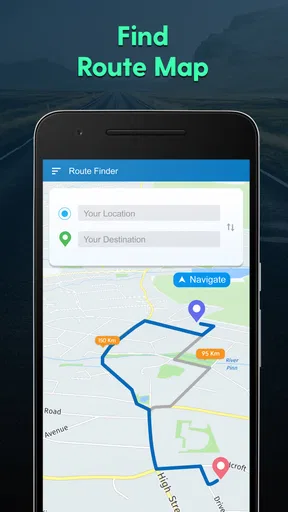
The first thing I look for is whether an app gets me from an empty screen to a sensible route with minimal thought. Here, the main value is the direct combination of route finding and shortest-path guidance. When I already know where I want to go, the app’s purpose is clear: enter the destination, inspect the proposed path, and use the map to keep moving in the right direction.
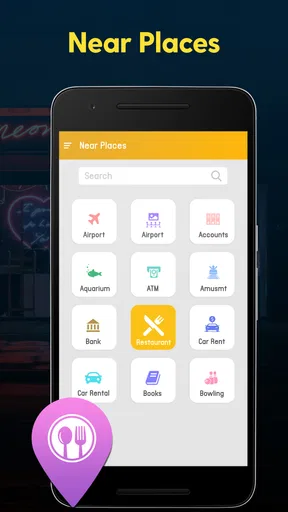
That simplicity is helpful when I am standing outside a station, leaving a shop, or trying to reach a place I have never visited. I do not necessarily need a large ecosystem of travel tools at that moment. I need a route I can understand quickly. The nearby-places function adds another useful layer, especially when the destination is not a specific address but a practical need such as finding food, fuel, or another local point of interest.
I would still take a moment to check the route before setting off rather than accepting the first result automatically. “Shortest” does not always mean most convenient. A shorter path may involve more turns, less familiar roads, or a route that is only attractive on the map. The app is useful for presenting a direction, but I remain responsible for deciding whether that direction matches the way I actually want to travel.
What the speed feels like when I need an answer
For ordinary lookups, I expect this app to feel most comfortable when I use it in short sessions: search for a place, inspect the route, and close it when I have enough information. That workflow suits the app’s focused feature set. I would not treat it as a reason to keep several map layers or searches open at once, because a navigation screen is most useful when it stays uncluttered.
A practical habit is to search for the destination before I am already in motion. That gives me time to compare the suggested path with the surrounding roads and to notice whether the nearby-place search is returning something useful. It also reduces the pressure of trying to type or make decisions while travelling. In my experience, the best performance impression from a navigation app comes not only from raw responsiveness but from asking it to do one clear task at a time.
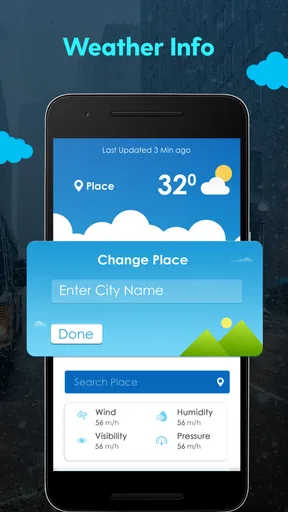
The weather update is particularly handy as a departure check rather than something I would constantly monitor during navigation. Before a walk, a short drive, or a visit to a new area, I can use the same app to think about the route and the conditions. That saves a little context switching, although I would still use a dedicated weather service when I need deeper forecasting detail.
Handling a realistic everyday trip
Imagine I am visiting a new part of town for an appointment. I can first search for the destination, review the route, and then look for a nearby place to wait or grab something before the appointment. If the weather looks unsettled, the update gives me one more reason to decide whether I should leave earlier or bring suitable clothing. That is a small workflow, but it shows where this app makes sense: several lightweight decisions connected to one outing.
On the way back, I might use the shortest-path option to see whether there is a more direct route than the one I took earlier. I would not assume the return journey should simply reverse the original path. A quick second search can reveal a more suitable option, especially when my final destination has changed or I am leaving from a different nearby place.
The trade-off is that this style of app rewards preparation and attention. It can help me choose a route, but it does not replace common sense about road conditions, access restrictions, temporary changes, or whether a path is comfortable for the way I am travelling. For a familiar local trip, that is rarely a serious problem. For an unfamiliar or high-pressure journey, I would want to verify important details before depending on it.
Stability during heavier use
Navigation apps are tested more severely when I ask them to do several things around one trip: search repeatedly, move between route views, inspect nearby locations, and check weather information. In those moments, I prefer a disciplined workflow. I would complete the place search first, settle on a route, and only then use the nearby and weather tools. Keeping the task sequence simple should make the experience easier to follow and reduce the chance of losing the route I actually need.
For a long outing, I would also avoid treating the phone as an unlimited navigation appliance. Extended screen use can be demanding on any device, and the practical concern is not just whether the app opens quickly but whether the phone remains comfortable to use throughout the journey. Lowering unnecessary screen activity, keeping the device charged, and checking the route before departure are sensible habits with this app.
The app’s current version is 3.78, which suggests an actively maintained product line rather than an abandoned experiment. I see that as reassuring, but I would not turn a version number into a promise that every phone will behave identically. Device age, available storage, background activity, and the quality of the connection can all affect how a navigation app feels in practice.
Recovery when plans change
A route is rarely the end of the story. I may pass the intended turn, decide to stop somewhere nearby, or discover that my original destination is no longer the right one. The useful recovery method here is to pause, search again, and treat the new location or nearby place as the starting point for the next decision. That sounds obvious, but it is better than trying to force the original route to fit a changed plan.
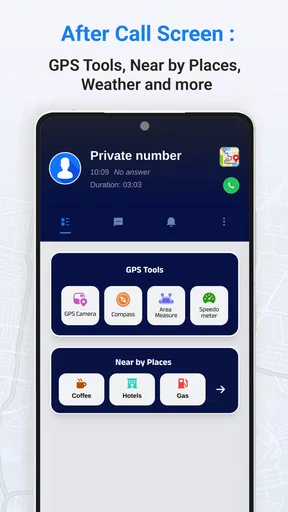
I also like the idea of using nearby-place searches as a recovery tool rather than only as a discovery feature. If I need a practical stop, I can search around my current area instead of abandoning the navigation task and opening another map service. This is one of the less obvious strengths of combining route guidance with local search: it supports the small interruptions that make real journeys different from a simple start-to-finish line.
At the same time, I would not wait until the last second to make a major change. Pulling over safely, checking the new route, and then continuing is the sensible approach. The app can help me reorganize a trip, but it cannot make an unsafe interaction safe.
Resource demands and older devices
GPS Navigation, Map Directions supports devices running Android 7.0 or later, so it is available to people who are not using the newest phones. That broad compatibility is useful for keeping an older spare phone in the car or avoiding an upgrade solely for navigation. However, minimum operating-system support does not mean every older handset will offer the same smooth experience as a newer one.
On a modest device, I would keep expectations realistic. A navigation app needs enough room to display a map, process searches, and keep the screen active. If the phone is already crowded with applications or frequently pauses when switching tasks, I would close unnecessary background apps before starting a journey. I would also test the app at home before relying on it for an unfamiliar route. That quick trial is more valuable than discovering a device limitation beside a busy road.
For a newer phone, the likely benefit is less about unlocking a completely different product and more about having a more comfortable overall session. A larger or brighter display can make route reading easier, while a responsive handset makes destination changes less frustrating. The app itself cannot solve poor visibility, weak battery health, or an awkward dashboard position.
How it compares with usual navigation alternatives
The most obvious alternatives are large map platforms that combine navigation with extensive place databases, traffic information, transit planning, saved locations, and other connected services. Those tools are usually the stronger choice when I need rich local detail, complex travel planning, or a mature ecosystem built around a particular account and device.
This app’s argument is different. It puts route finding, shortest-path thinking, nearby places, and weather updates close together in a simpler package. I can see the appeal for someone who wants a practical navigation utility without making every journey part of a larger mapping system. It may also suit a secondary phone or a user who prefers a less crowded interface.
The compromise is depth. If my trip depends on highly detailed transport choices, extensive place information, or advanced planning across several stops, I would choose a more specialized or full-featured alternative. If I only need a direct route and an occasional local search, the lighter approach can be enough. The right choice depends less on which app has the longest feature list and more on whether I value breadth or quick, contained tasks.
Who should use it and who should skip it
I would recommend it to casual drivers, walkers exploring an unfamiliar neighborhood, people who often need a quick nearby-place search, and anyone who likes checking travel conditions alongside a route. It is also a reasonable candidate for an older compatible Android phone, provided the device handles map applications comfortably.
I would be more cautious about recommending it to someone who needs navigation for demanding professional travel, complicated multi-stop planning, or journeys where detailed live information is essential. In those situations, a more established all-in-one map service may offer the stronger safety net. I would also skip it if I wanted a dedicated, detailed weather tool rather than a convenient weather check attached to a navigation workflow.
The app is free to install, which makes trying it low-risk. Some in-app purchases cost $2.49 per item, so I would review any upgrade prompt carefully and decide whether the extra value matches my use before paying. The content rating is Everyone, making it suitable for a broad audience, although parents should still apply their normal judgement about how a child uses location-oriented apps.
My final performance verdict
After looking at the way it fits into real trips, I see GPS Navigation, Map Directions as a practical, compact navigation option rather than a complete replacement for every mapping service. Its strongest qualities are the clear focus on route finding, the useful shortest-path angle, and the convenience of checking nearby places and weather in the same app.
Its performance story is best when I keep the workflow simple: search, inspect, choose, and move. It should be tested on the phone I plan to use, especially if that device is older or already struggles with demanding apps. I would also prepare important routes before travelling, use safe stopping habits when plans change, and treat weather information as a helpful check rather than a substitute for detailed forecasting.
With a 3.8 average from around 18 thousand ratings and more than 10 million installs, it has clearly reached a substantial audience. Those figures do not make it perfect, but they do show that it is more than an obscure utility. My recommendation is straightforward: choose it when you want an approachable route tool with a few useful travel extras, not when you need the deepest navigation ecosystem available.
ShamiTech Apps has made something that can be genuinely handy for everyday movement. I would keep it installed as a lightweight option for local routes, quick detours, and nearby-place searches. For major journeys, unfamiliar travel conditions, or advanced planning, I would compare its result with a fuller mapping alternative before setting off.
Verdict
Strengths of GPS Navigation, Map Directions
- Clear turn-by-turn directions for driving, walking, and cycling
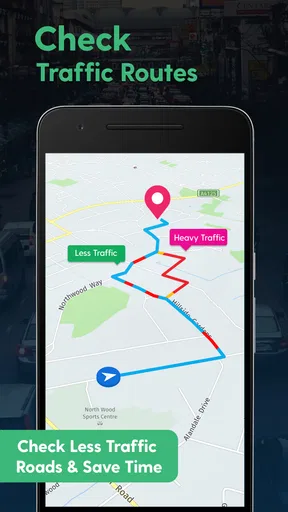
- Live traffic updates help users avoid delays and crowded roads
- Offline maps remain useful when mobile coverage is unavailable
- Voice guidance lets drivers navigate without constantly viewing the screen
- Search makes it easy to find nearby shops, services, and landmarks
Limitations of GPS Navigation, Map Directions
- Accurate navigation may require continuous GPS and location access
- Traffic information can be delayed or unavailable in some regions
- Offline map downloads can consume considerable storage space
- Frequent location use may noticeably reduce battery life
- Route suggestions may change unexpectedly when road data is outdated
Similar Picks in This Category
View All
Uber - Request a ride
Uber Technologies, Inc.4.7


inDrive. Rides with fair fares
® SUOL INNOVATIONS LTD4.8

Yandex Go: Taxi Food Delivery
Mikromobilnost LLC Belgrade4.8

Bolt: Request a Ride
Bolt Technology4.8

Rapido: Bike-Taxi, Auto & Cabs
Rapido Bike Taxi4.8
Frequently Asked Questions
What is GPS Navigation, Map Directions, and what can I use it for?
GPS Navigation, Map Directions is a mobile navigation app designed to help you plan routes, follow turn-by-turn directions, and find locations while traveling. It can be useful for driving, walking, or exploring unfamiliar areas, depending on the features available in your version. Before downloading, check whether it supports your preferred travel mode, local map coverage, traffic information, and the countries or regions where you intend to use it.
Does GPS Navigation, Map Directions work without an internet connection?
The app may provide some offline functionality, but the exact experience depends on whether maps can be downloaded in advance and which features require live data. Route updates, traffic conditions, business information, and location searches commonly need an internet connection. If you plan to travel through areas with weak service, test downloaded maps beforehand and confirm that offline turn-by-turn navigation is supported for your destination.
Does GPS Navigation, Map Directions require access to my location?
Yes, navigation apps generally need location permission to determine your position and provide accurate directions. GPS Navigation, Map Directions may also request access to notifications, mobile data, or background location for features such as rerouting and spoken guidance. You can review and change these permissions in your device settings, but limiting location access may reduce accuracy or prevent certain navigation features from working properly.
Are the directions and map information accurate?
GPS Navigation, Map Directions can be helpful for everyday trips, but no navigation app is perfect. Accuracy may be affected by poor GPS reception, outdated map data, road construction, private roads, incorrect addresses, or changes in local traffic rules. Always compare the suggested route with road signs and current conditions, and never rely on the app alone in situations where safety or emergency access is involved.
Is GPS Navigation, Map Directions free to download and use?
The app may be available as a free download, although some functions can include advertisements, optional purchases, subscriptions, or limits on advanced tools. These may involve premium map features, traffic information, voice guidance, offline navigation, or removal of advertising. Read the app-store listing carefully before installing, and review any subscription terms so you understand the cost, renewal conditions, and features included.
